

A cyberattack can affect daily life without targeting your own laptop. If an organisation's systems are disrupted, customers may have trouble making payments, accessing information or using a service. The practical household response begins with the service you cannot use, while the cause and recovery are established by the organisation responsible.
Do not assume every outage is a cyberattack. Equipment faults, power problems and ordinary technical failures can look similar from the outside. Use verified updates, describe only what is confirmed and avoid turning an unavailable app into a prediction that every essential system will fail.
Household preparation has two useful parts: protecting your own accounts and reducing dependence on one live digital route. Familiar supplies, paper contacts, secure recovery arrangements and a clear family plan can help with a cyber-related interruption and many other ordinary outages too.
Understand the difference between personal compromise and service disruption
Your account being accessed without permission is different from a provider's service being unavailable to many customers. Both may require action, but the first questions and contacts differ. Establish what you can observe rather than assuming the cause from a single error message.
If a provider confirms disruption, use its verified information about available services and next steps. If you see signs of unauthorised activity in your own account, follow that service's security and recovery process promptly. A general outage notice does not explain away suspicious transactions or unexpected security changes.
Keep the two issues separate in your notes. Record which service failed, when, what the official update says and whether your own account shows a specific concern. That makes it easier to obtain appropriate help without spreading an unverified explanation.
Start with the household functions affected
Ask what you cannot currently do. Is it a payment, a booking, a prescription request, a communication channel or access to a document? Defining the function helps identify a practical alternative instead of treating the entire digital environment as one problem.
Then ask whether the need is urgent. A delayed entertainment service is different from an interruption to an essential care arrangement. Use the relevant professional or emergency support route where a health or immediate safety need exists.
Make a short list of the next necessary tasks. You may need a verified contact number, a physical card, a paper reference or a suitable place to wait. A clear next action is more useful than repeatedly refreshing several pages that are all affected by the same service problem.

Build modest supplies to reduce urgent transactions
Familiar food, safe water and ordinary personal essentials can remove the pressure to buy something immediately when payments or ordering systems fail. Build these supplies gradually and use them in normal rotation. There is no need to respond to a speculative threat with panic buying.
Consider items that are difficult to substitute, such as a prescribed diet, care supply or pet product. Discuss continuity through the appropriate provider where needed. Money alone cannot solve a stock, prescription or storage issue.
Keep the plan proportionate. The same 72-hour household kit can help with several types of disruption. You do not need a separate collection of products for every possible technical cause.
Keep a secure offline information set
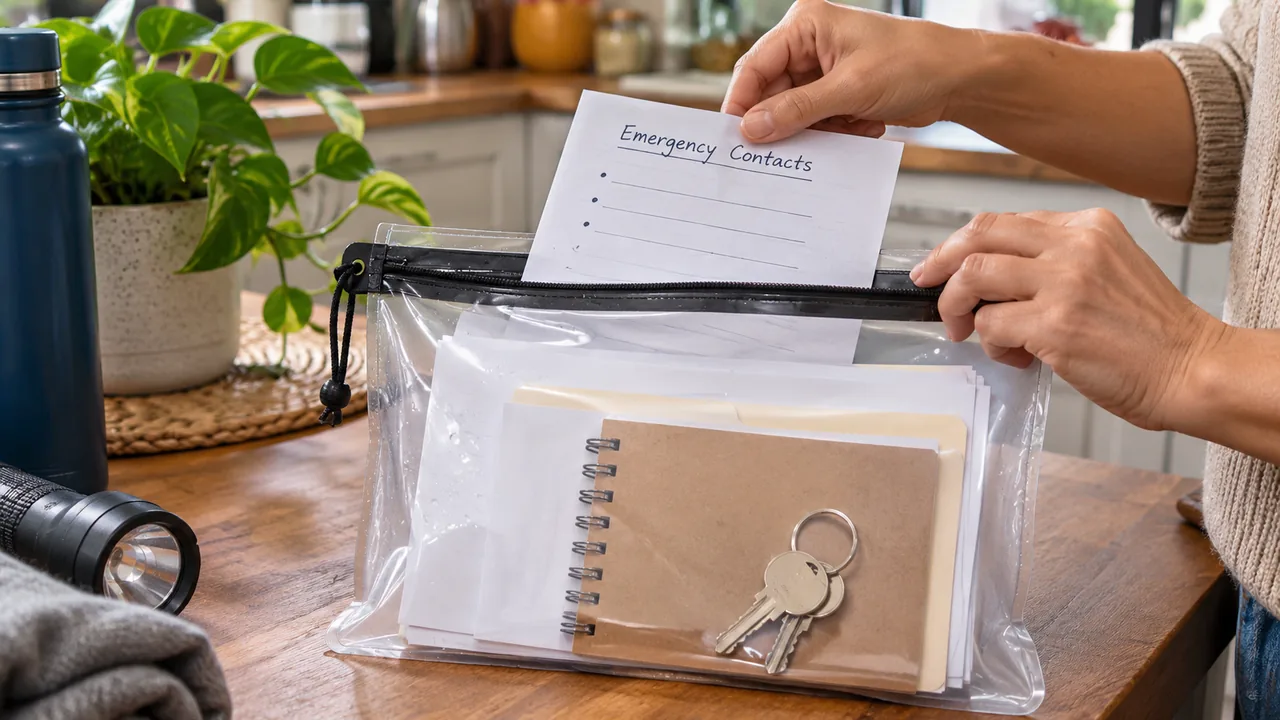
Record the contacts, addresses and references needed for essential tasks. A paper contact sheet can remain useful when a phone is flat or a cloud account is unavailable. Store it where responsible household members can access it without exposing sensitive details casually.
Save useful documents offline where appropriate and test that they can be opened without a live login. A file listed in a cloud folder may still need downloading. Keep the most important information available in another suitable form if a single device is lost or unavailable.
Choose information according to purpose. An emergency folder does not need every password or full financial record. It needs enough to identify the right service, explain the need and follow the appropriate process. Protect private details and review the set when circumstances change.
Protect the email account that supports other accounts
Email often receives account-recovery messages and important service updates. The National Cyber Security Centre recommends a strong separate password for it and suitable additional account protection. Use the provider's current security instructions rather than an unexpected link offering a quick fix.
Turn on supported two-step verification for important accounts and understand the recovery options. Keep approved backup methods secure so that losing access to a phone does not automatically remove every route to the account.
Do not share passwords, one-time codes or recovery codes with someone who contacts you unexpectedly. A claim to be assisting during an outage does not establish authority. Reach the organisation independently through a known route if a message asks for security information or urgent account action.

Keep devices and software maintained
Install appropriate software and app updates through official mechanisms, following the device's instructions. Security updates address known weaknesses. Do not disable protection or install unfamiliar software because an unsolicited message claims it will restore a disrupted service.
Maintain backups of important data in a suitable arrangement and check that you know how to recover what matters. A backup that nobody can find or use is a weak part of the plan. Follow reputable provider or NCSC guidance for the actual devices and services you use.
Keep the task manageable. Start with the accounts and documents whose loss would cause the most difficulty. You do not need to become an enterprise security specialist to take useful household steps, but you do need clear instructions and secure habits.
Make recovery independent enough to be useful
Review where account recovery depends on the same device, phone number or email that may be unavailable. Use the provider's supported alternatives and store backup codes securely where offered. Do not create an improvised public list of access details in the name of emergency convenience.
Consider what an authorised helper may need if you are unavailable, while respecting the service's rules and your privacy. A trusted person knowing the contact route is different from everyone sharing one password. Ask the provider about appropriate authorised access where relevant.
Test only through normal safe procedures. Do not deliberately lock yourself out or disable important protections to stage a household drill. Check that recovery information is current and raise questions before an incident makes access urgent.
Plan for payment interruptions without moving money impulsively
A physical card, a modest affordable cash reserve and enough essentials can provide options, but none guarantees that every retailer will operate normally. Ask what payment methods are available and use verified bank information for account questions.
Be especially cautious about instructions to move funds to a 'safe account' or verify security details through a new link. Contact the bank independently. An actual disruption can make a scam's urgent story sound plausible without making it genuine.
Avoid treating one failed payment as evidence about the safety of all deposits or the condition of every bank. The payment-outage guide explains how to keep the decision practical and proportionate.

Keep health and care services in a separate continuity plan
If treatment, monitoring or a personal alarm depends on a network, ask the provider what happens when that connection is unavailable. A charged device may still lack access to an external service. Use the clinical or equipment provider's approved arrangements.
Keep contact routes and essential information available offline. Know which needs can wait for normal service and which require an alternative professional route. Do not change treatment or improvise device settings because a usual app or booking system is unavailable.
If there is an immediate threat to life, seek emergency help. A provider's cyber incident investigation should not become the household's reason to wait through a time-critical health problem. Your plan should identify the practical support pathway before it is needed.
Check updates through an independent route
Use the provider's known website, official app or verified telephone details where available. Be cautious about search adverts, unexpected messages and copied pages that appear during disruption. A familiar logo or convincing wording does not prove a message is genuine.
Check when an update was published and whether it applies to your service or area. Preserve any uncertainty when sharing it. A provider saying it is investigating does not mean a cause, data loss or restoration time has been confirmed.
If the main site is unavailable, look for the organisation's established alternative communications through reliable sources. Do not accept an unfamiliar social account simply because it posts frequent updates. A communication gap is a reason for careful verification, not lower standards.
Be alert to opportunistic messages
Criminals may use an outage as a reason to request payment, credentials or a software installation. Stop and check before acting. Do not approve a login prompt you did not initiate or provide a code to someone who claims they need it to help.
Contact the relevant organisation through an independently verified route if concerned. If you have already shared information or noticed unauthorised activity, follow its account security and reporting process promptly. Keep useful records without continuing to engage with a suspected scammer.
Avoid warning others by forwarding an active malicious link without context. You can describe the message or use an appropriate reporting route. Helpful intentions should not spread the same access point to more people.
Example: the family cannot access a usual service
Imagine a provider confirms that its online system is temporarily unavailable. The household identifies the actual need: a routine transaction that can wait until tomorrow. It keeps the reference on paper, checks the official update at a sensible interval and avoids entering details into a new site claiming to offer a workaround.
Now change the need to something time-critical, such as a care arrangement. The same unavailable website requires a different response: use the approved alternative contact and explain the essential requirement. Waiting is not automatically appropriate merely because the provider is investigating.
The useful lesson is to separate cause from consequence. You may not know the technical cause, but you can still identify the need, find a verified route and choose a proportionate next action without accepting rumours or unsafe shortcuts.
Example: an outage-themed account message arrives
Imagine a text says your bank account must be moved immediately because of a national cyber incident. It includes a link and asks for security codes. The household does not use those contact details or share information. It checks the bank through its known route.
If a real service interruption exists, that fact still does not authenticate the text. Criminals can refer to genuine events. Keep the account response tied to verified information and the bank's actual instructions, not to the emotional urgency of the message.
This is a useful conversation to have with relatives before a disruption. Agree that asking for a second check is sensible, and keep the verified contact route accessible. Practical support can help someone pause without making them feel embarrassed about receiving a convincing message.
Review once the provider restores service
Check the provider's official follow-up and complete any genuine account action through a verified route. Do not assume every service has recovered simultaneously. If you see unexplained account activity, raise it through the appropriate process rather than attributing it to the outage automatically.
Update contact information, replenish any supplies and note the dependency that caused the most difficulty. Perhaps a document needed an offline copy, a recovery method was outdated or the family lacked a shared contact plan.
Preparedness does not require knowing the technical cause before taking useful steps. Secure accounts, manageable supplies and a few independent information routes can reduce pressure during a cyber-related service outage while also improving everyday household resilience.
Check one dependency at a time
Choose an essential household task and write how it normally works. For example, a document may be stored in one cloud account, opened through one phone and recovered through that same phone number. Listing the sequence can reveal that several apparent backups depend on one unavailable route.
Now identify an appropriate alternative for the task, rather than trying to make every system independent at once. A concise paper reference may solve a contact problem, while a provider's supported recovery method addresses account access. These are different functions and should not be confused with copying all private information into one unsecured folder.
Test the alternative through an ordinary safe procedure. Open an approved offline copy, check that the contact number is current or review the service's recovery instructions. Do not disable protection, simulate an attack or deliberately interrupt essential care to make the exercise more realistic.
Record the next action precisely. 'Save the relevant document for offline access and check it opens' is easier to finish than 'prepare for cyberattack'. If a provider must answer a question, write the specific question and use its verified contact route.
Repeat the exercise for another important task when time allows. The aim is gradual improvement in functions that matter to your household, not a complete technical audit of every service you use. A few understood alternatives can reduce the pressure created by a wider outage without encouraging unnecessary purchases or insecure shortcuts.
Share the relevant arrangement with another responsible person and keep the review date visible. An alternative known only to the usual organiser can become another hidden dependency when that person is away.
Frequently asked questions
Does an unavailable website mean a cyberattack is happening?
No. Services can fail for many reasons, including ordinary technical and power problems. Use verified provider information and describe only what is confirmed. You can still respond to the practical need without guessing the cause. If your own account shows specific unauthorised activity, follow the service's security process rather than assuming a general outage explains it.
Will strong passwords prevent a provider outage?
They help protect your own accounts but do not keep every external service available. Household preparation needs both account security and practical alternatives for disrupted functions. Keep useful contacts and documents available offline, maintain modest supplies and know the appropriate route for essential care or urgent needs.
Should I turn off two-step verification during disruption?
Do not remove protection merely because an unexpected message suggests it. Use the provider's supported recovery and backup methods if access is difficult. Keep recovery information secure and current before an incident. Contact the service through a verified route rather than following a link that promises to bypass an unavailable system.
How much food or cash should I keep for a cyberattack?
Use a proportionate household disruption plan rather than a separate panic-driven stockpile. Consider familiar supplies and an affordable payment alternative based on your real needs. No fixed quantity guarantees a response to every event. Build gradually and keep medical, dietary and accessibility requirements in their appropriate individual plans.
What if a message says my money must be moved urgently?
Do not act through the message's link or contact details. Reach the bank independently through a known verified route and never share passwords, PINs or one-time codes with an unexpected caller. A real outage does not authenticate an urgent request. If you believe information or money has already been compromised, contact the bank promptly through its proper process.
Sources and further reading
NCSC: household online security